Work

Systems built around real work.

Selected workflows Galavate has digitised, simplified and automated across web and mobile.

Every screen on this page shows fictional data in the real product

01Paper process to digital form

Start from the form people already fill in.

Before
Field forms were filled in on paper and typed up later. Each digital form was coded by hand, down to where every answer printed on the page.
What changed
Forms are built in the system instead of coded. A blank PDF goes in, and the import finds its sections and fields and maps each answer to its box on the paper. The result opens as a draft for a person to check before anyone fills it in.

How it works

  • Reads a blank PDF or Word form in seven steps, from rendering its pages to mapping every answer box on the paper.
  • Test-prints a sample entry through the real print engine, checks each value sits in its box, and corrects the spots the check flags.
  • Opens as a draft that phones cannot see until someone publishes it.
  • One typed instruction changes the template, and the change is test-printed before it lands.
  • Corrections people make become house rules for the next import.

Evidence

  • Twenty document types digitised across the organisation

NextThe same template now drives the phone form, the printed form and the checker’s review.
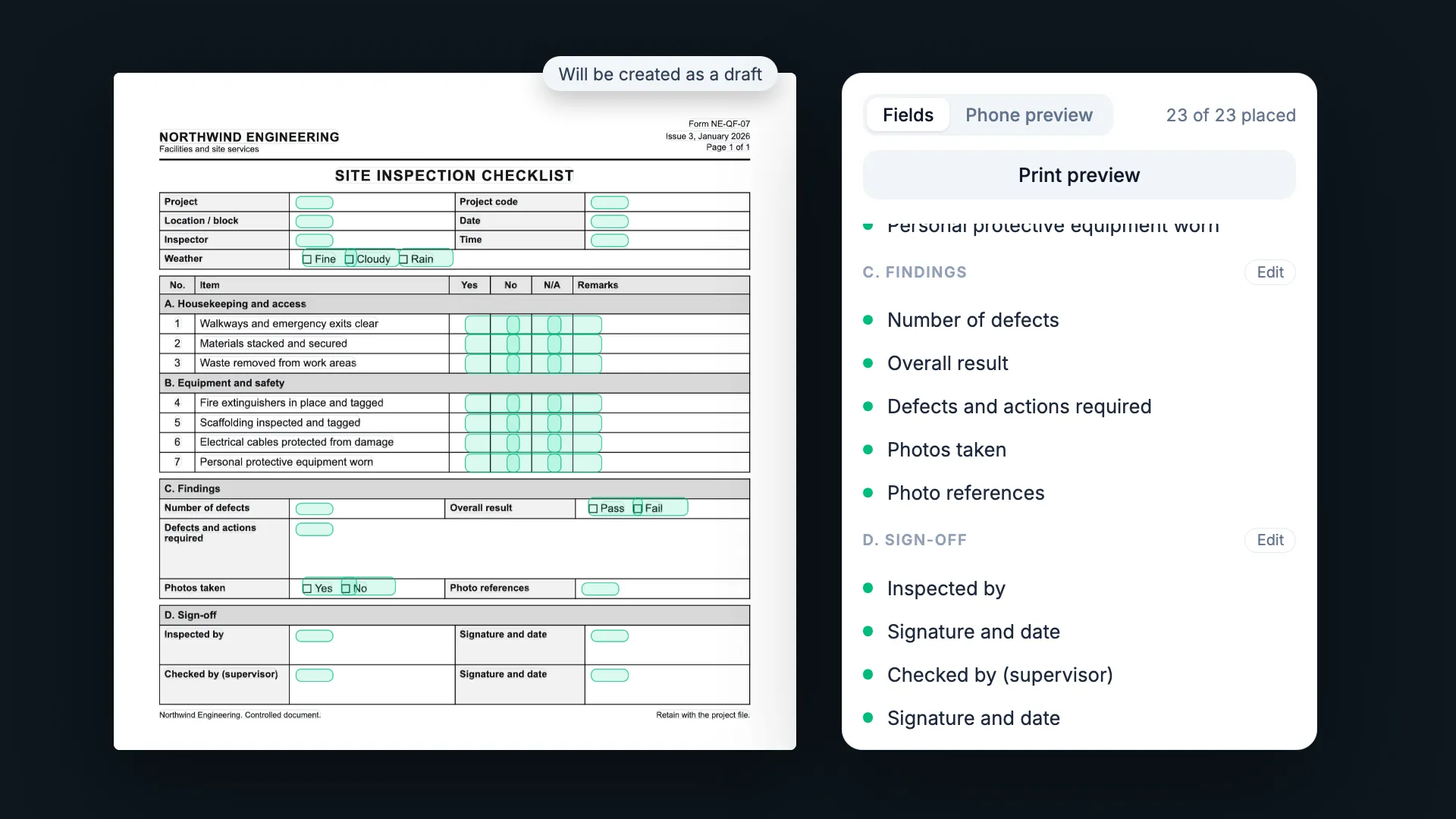
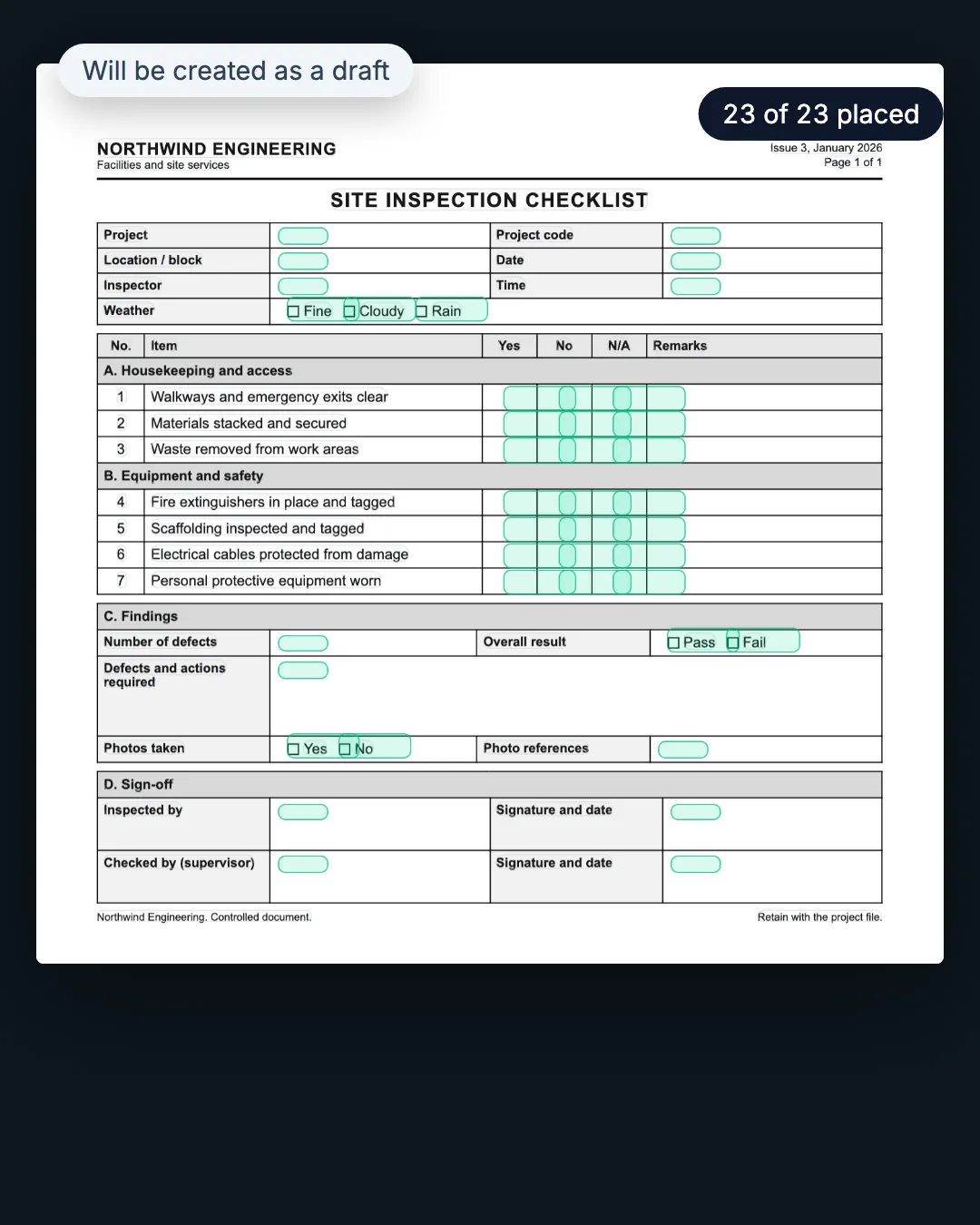
The imported form in the builder, 23 of 23 fields placed, as a draft.
A blank PDF form is dropped in and read in seven phases: sections, fields, every answer box mapped and test-printed. It opens as a draft with 23 of 23 fields placed, previews as the phone form and the printed paper, and one typed instruction removes a field, test-printed before it lands.
The imported form in the builder, 23 of 23 fields placed, as a draft.
A blank PDF form is dropped in and read in seven phases: sections, fields, every answer box mapped and test-printed. It opens as a draft with 23 of 23 fields placed, previews as the phone form and the printed paper, and one typed instruction removes a field, test-printed before it lands.

Fictional data · real product workflow, illustrated · waits shortened
02Offline field capture

Captured on site. Checked at the office.

Before
Paper field forms were carried back from site and typed up at the office.
What changed
The form moved onto the phone and the record moved with it: saved on the device when there is no signal, sent when a connection returns, and checked on the web.

How it works

  • Sections repeat with Add another; GPS, photo and barcode fields; calculations and show-or-hide logic shared by phone and web.
  • An out-of-range value raises a warning, and a missing required answer blocks the submit.
  • With no signal the entry waits on the phone as pending, then syncs with its photos when signal returns.
  • Every record prints back onto the original paper layout.

Evidence

  • Work carries on at the site and syncs when the phone finds a connection
  • Phone apps on the Apple App Store and Google Play

NextOffice review became the next workflow: checking each record as the printed form it will become.

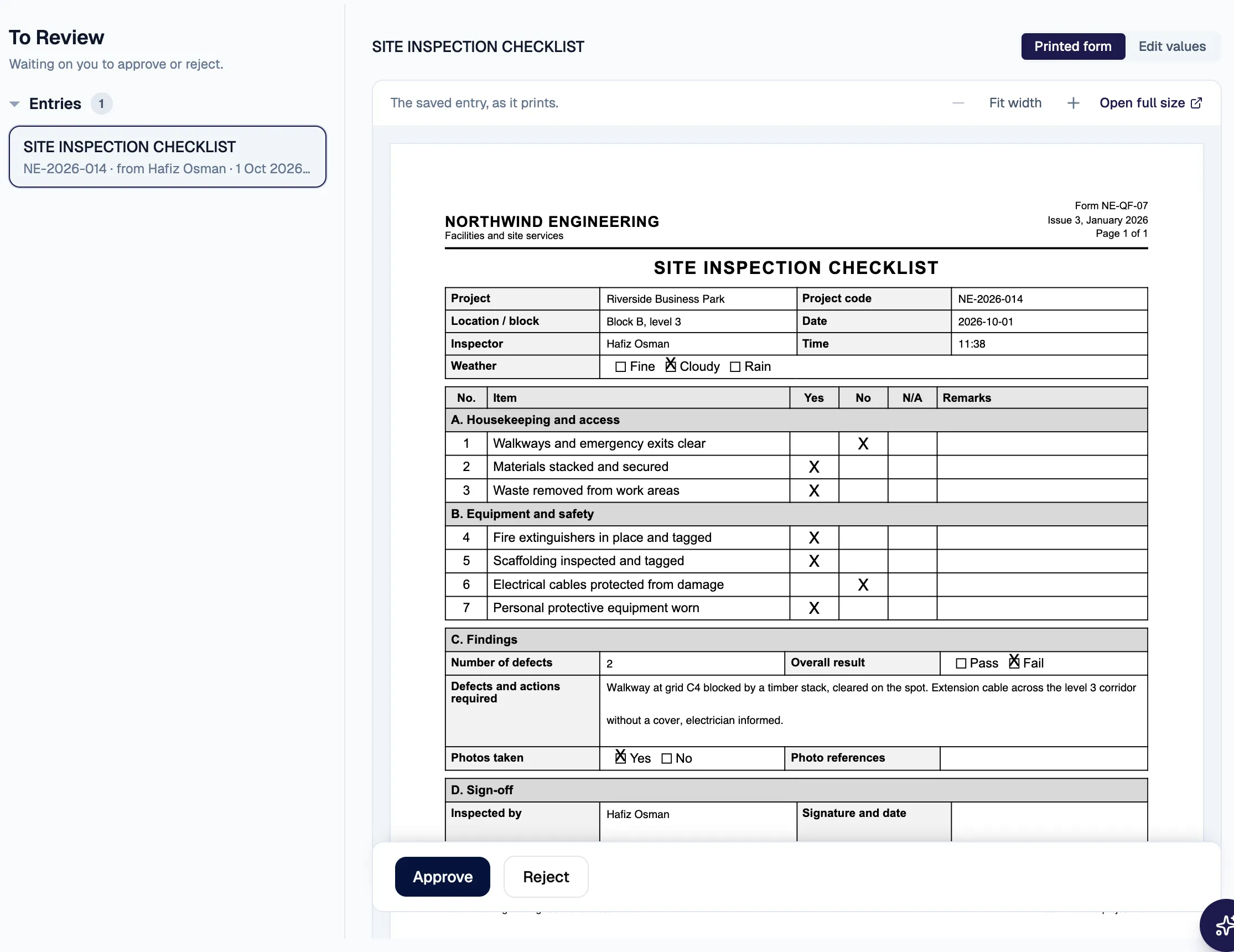
In the office, the synced record in the checker’s queue as its printed form.
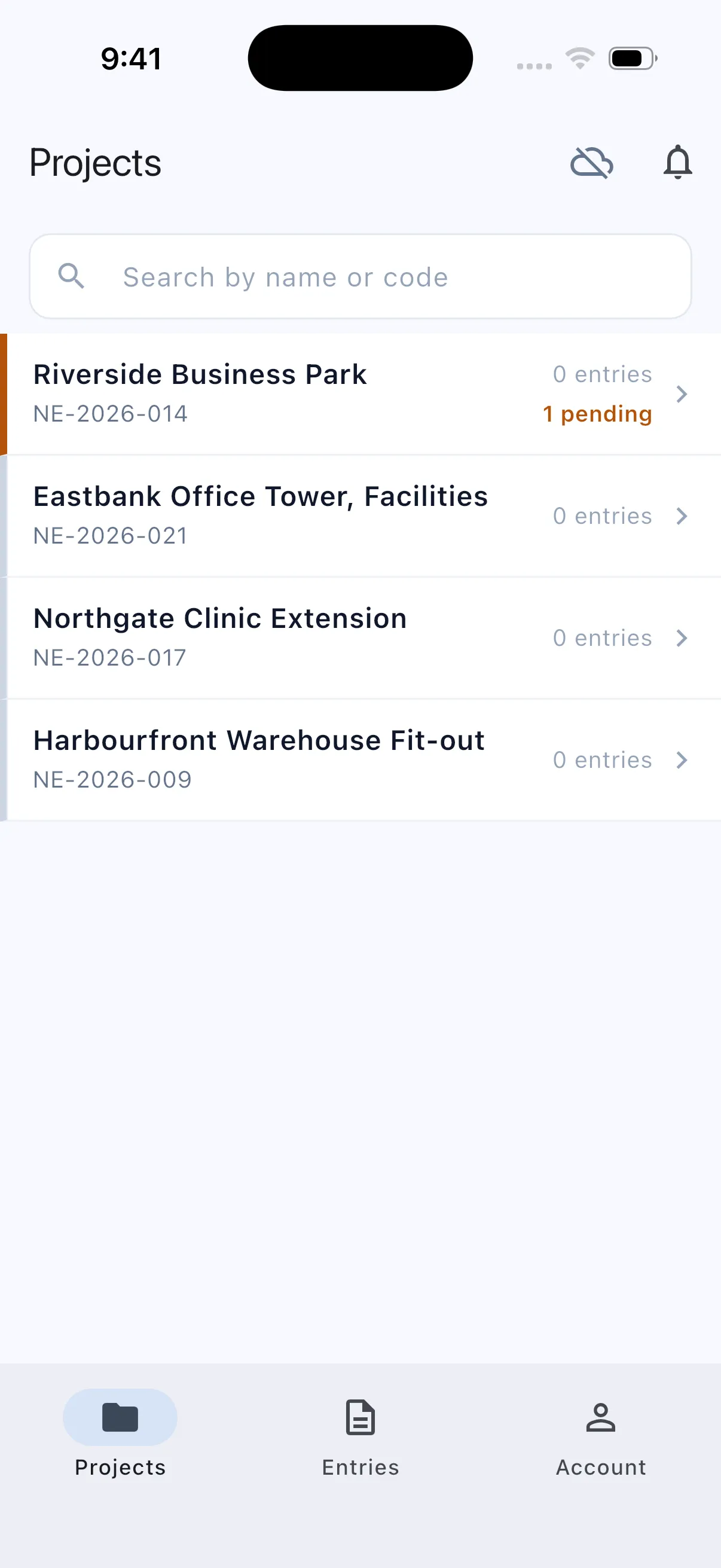
No signal: one record pending on the phone.
Signal back: the record synced.

Fictional data · real product screens

03Mail and parcels

From the gate to the person it was for, with a record at every step.

Before
A paper notebook signed by the recipient at pickup, and a paper acknowledgement form for outside deliveries.
What changed
Every handoff got an owner and a record. The guard logs the item, the desk registers it, a dispatch assistant delivers it and the recipient confirms it.

How it works

  • A mismatch between the desk’s count and the guard’s holds the item and tells both of them.
  • The usual dispatch assistant is preselected; anyone on leave sorts last with their return date.
  • The wording of every automatic email can be edited in the register’s settings.

NextThe same pattern now carries staff requests to the dispatch team: one assistant per request, a reference number, and a proof photo when it closes.

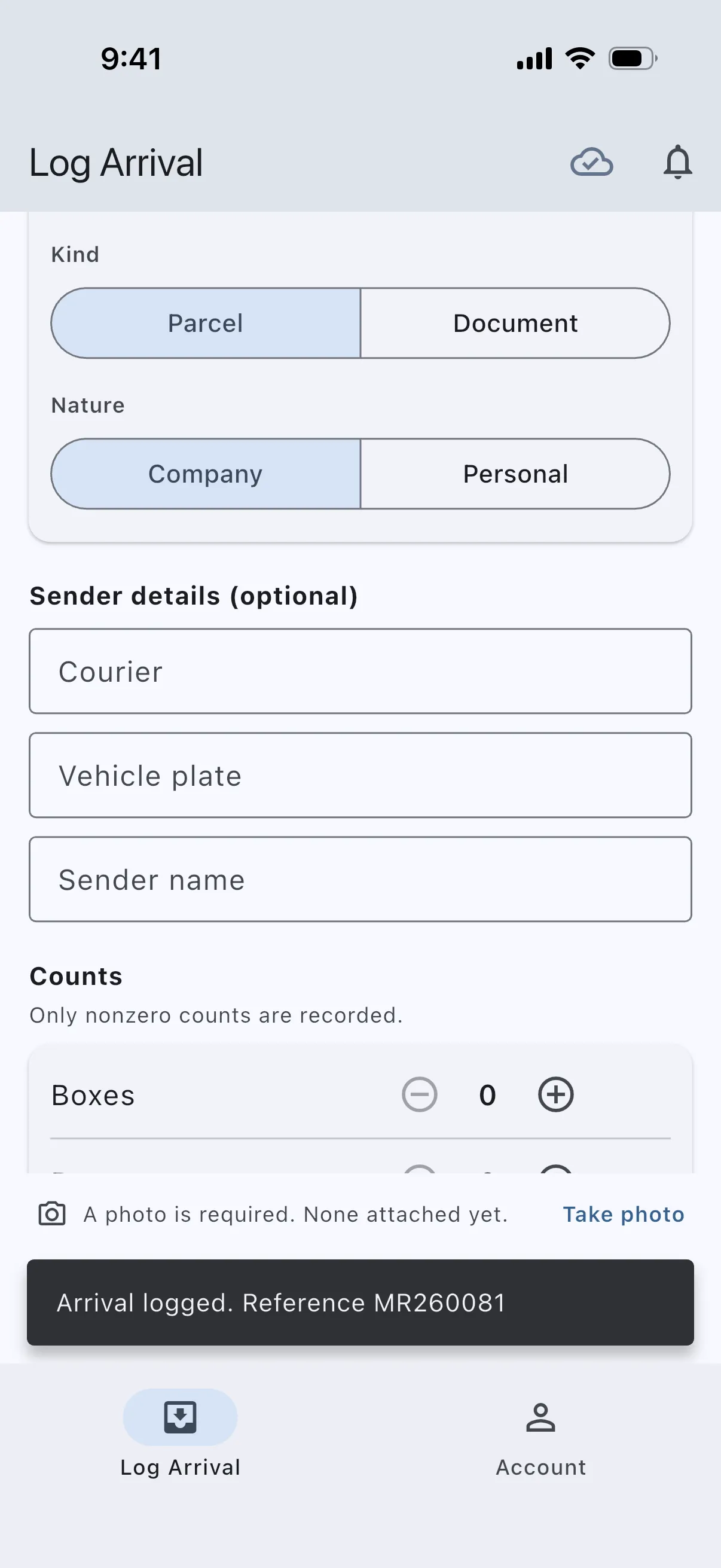
  1. The guard’s phone: arrival logged, reference MR260081.

    01Gate

    The guard logs the arrival on a phone, with a photo and the item counts. The system gives it a reference.

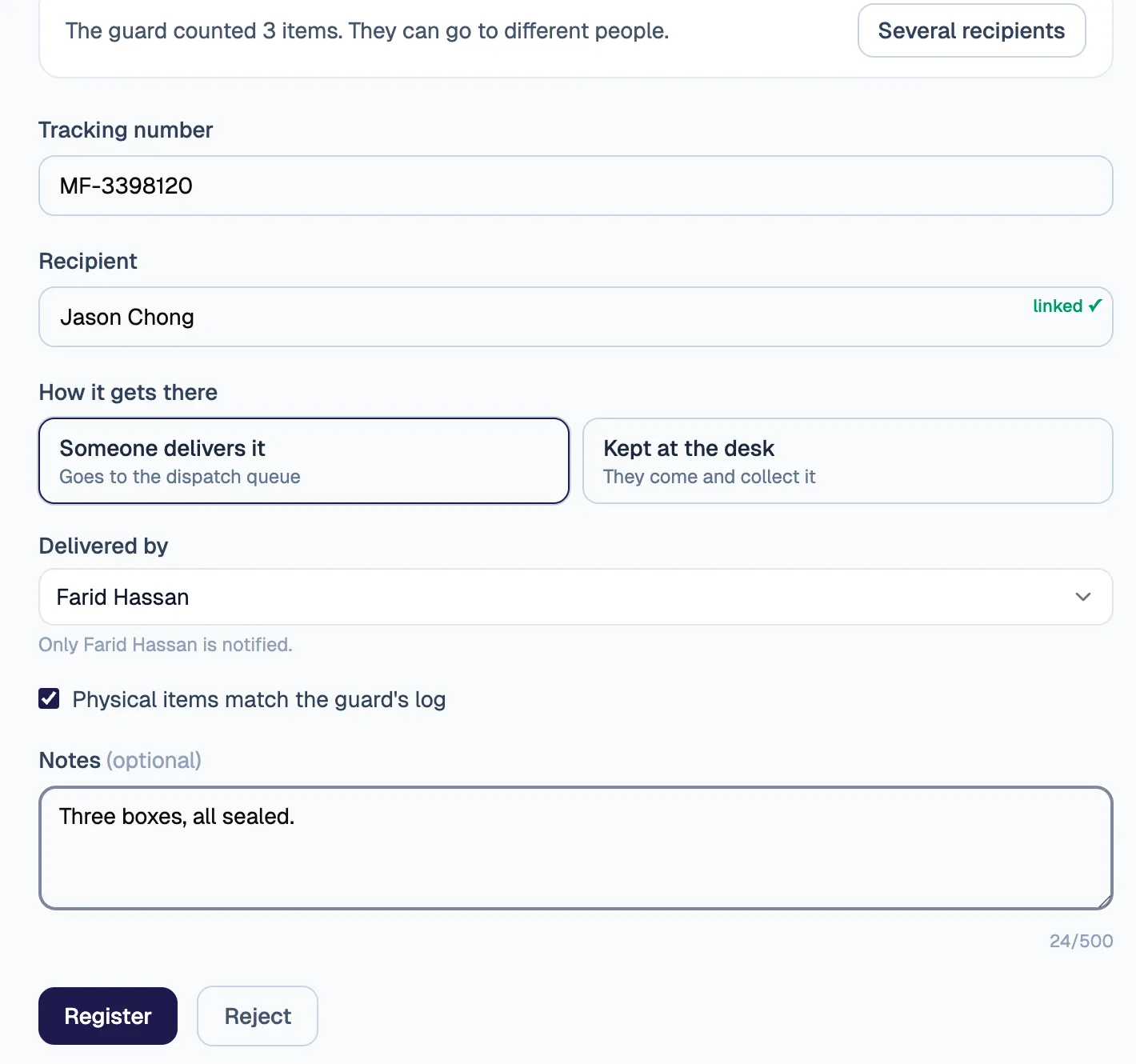
  2. The front desk: recipient Jason Chong, delivered by Farid Hassan, the items ticked as matching the guard’s log.

    02Front desk

    The desk picks who it is for and who delivers it, and ticks that the items match the guard’s count.

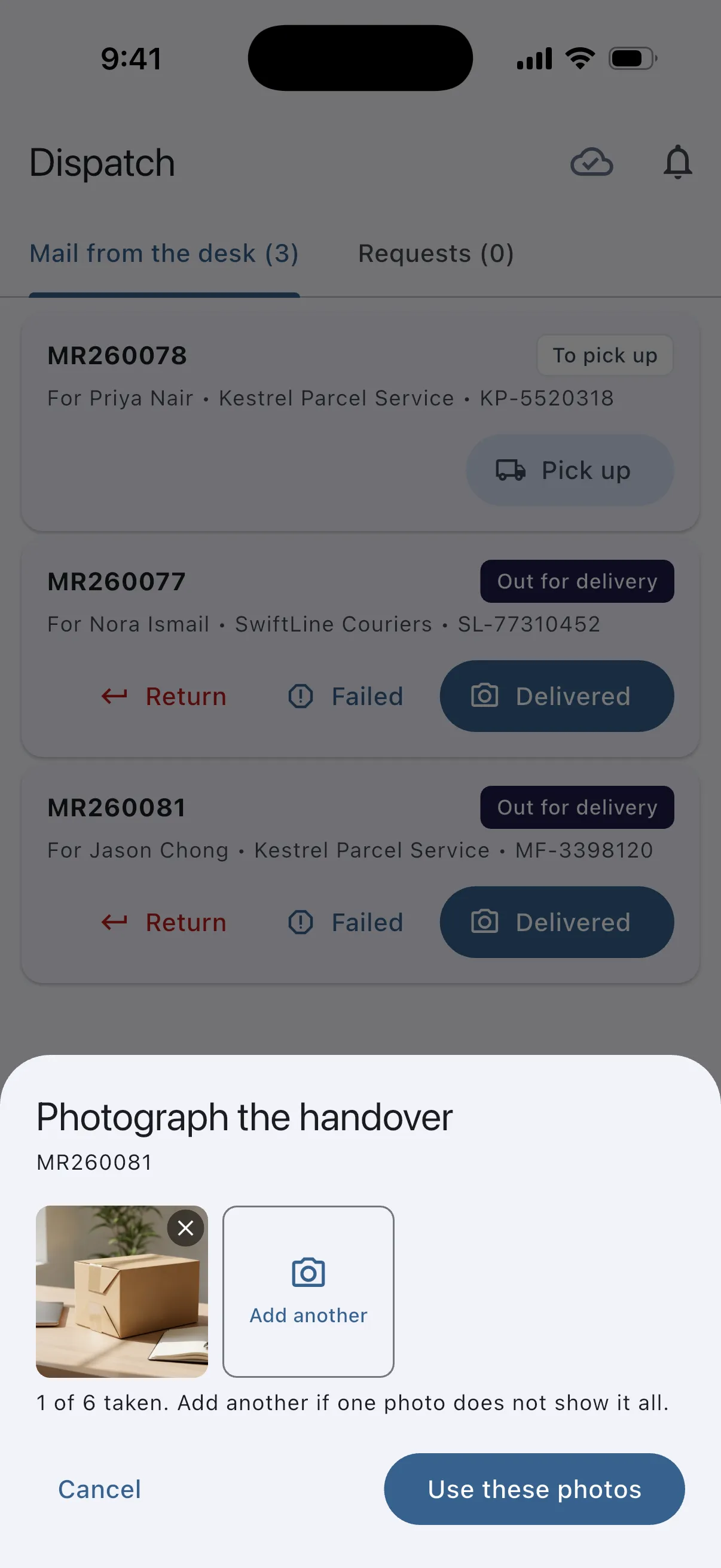
  3. The dispatch assistant’s phone: photograph the handover, one of six photos taken.

    03Dispatch

    The assistant’s phone lists it to pick up. Marking it delivered opens the camera for a photo of the handover.

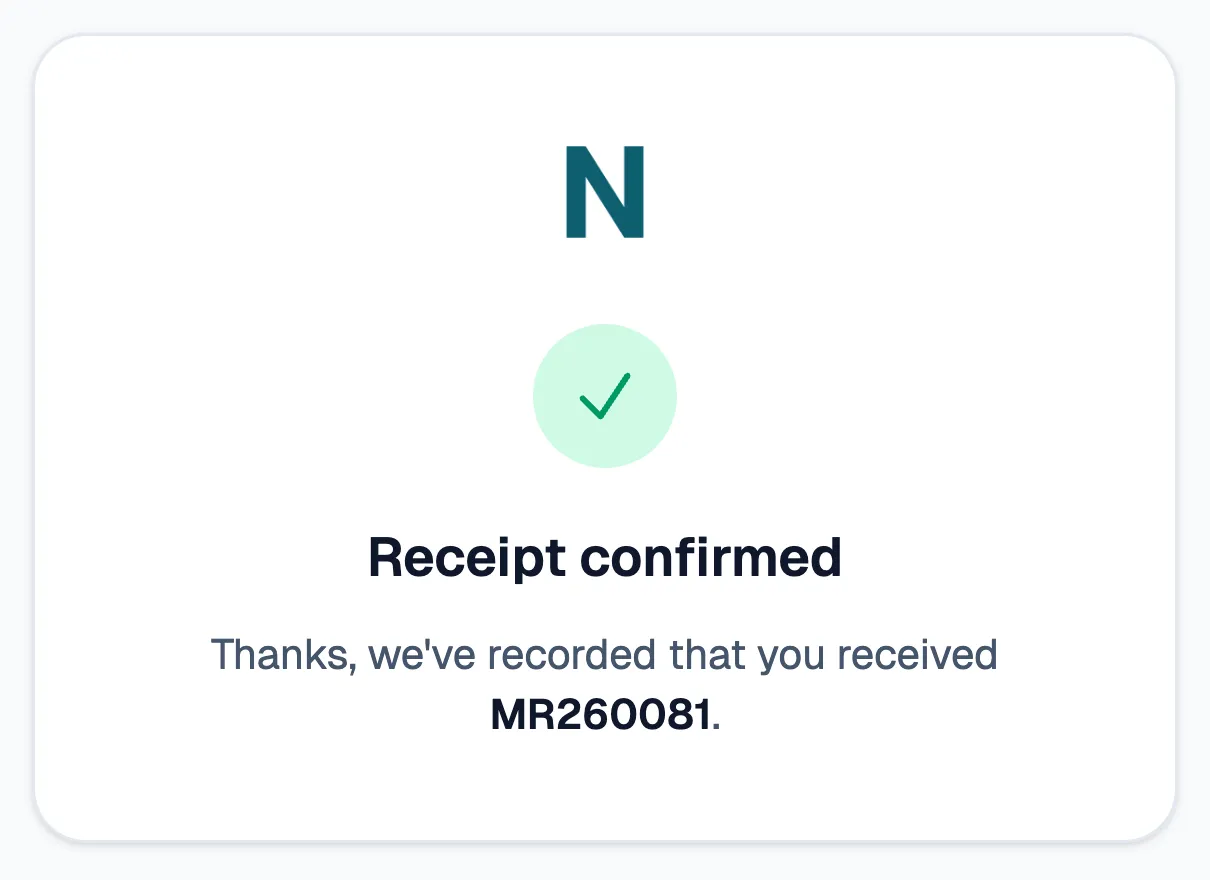
  4. The recipient’s confirmation page: receipt confirmed for MR260081.

    04Recipient

    The recipient confirms receipt from a link in the delivery email, without signing in, or reports that it never arrived.

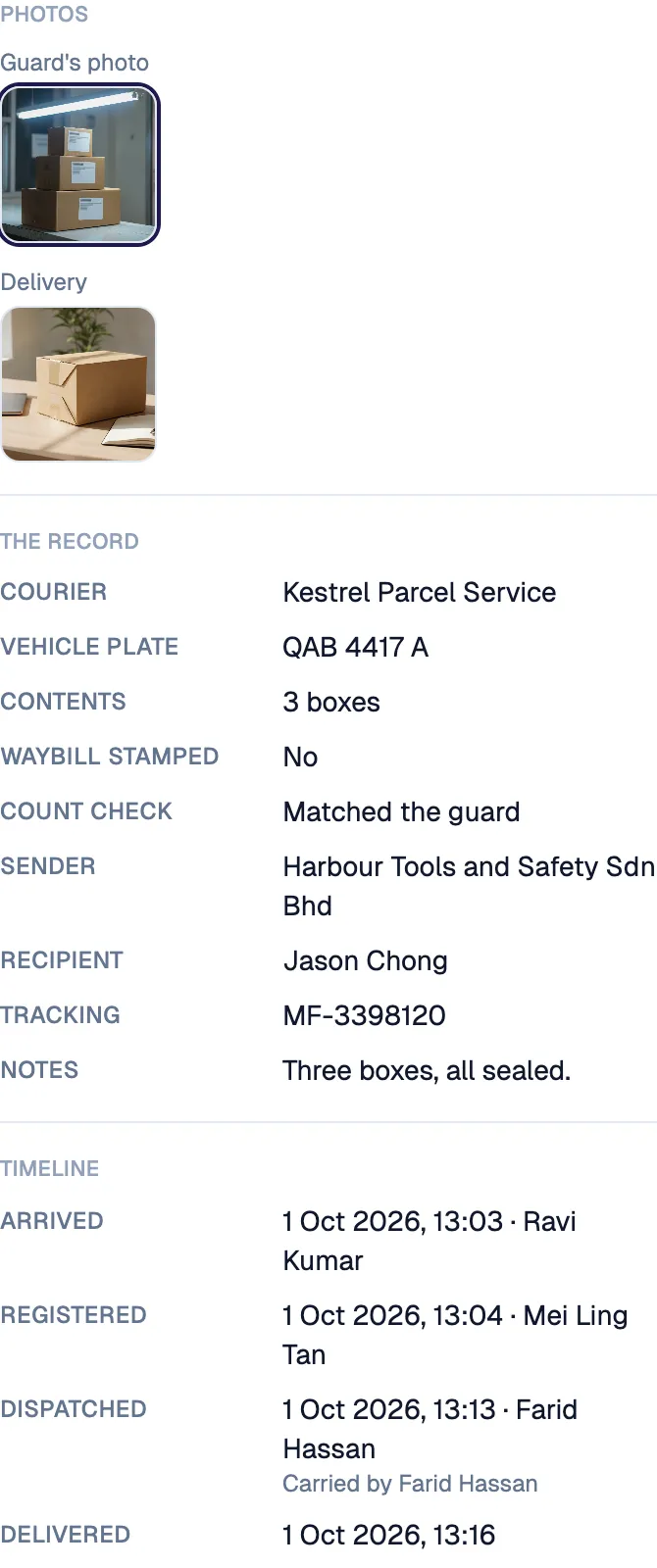
  5. The item’s record: the guard’s photo, the delivery photo, and the timeline from arrival to delivery.

    05The record

    The item’s page keeps both photos and a timeline of who did what, and when.

Fictional data · real product screens, one item walked through every step

04Checking records

Check the paper, not a row of fields.

Before
Checkers downloaded each record’s PDF to check it, because the printed form is what they sign off.
What changed
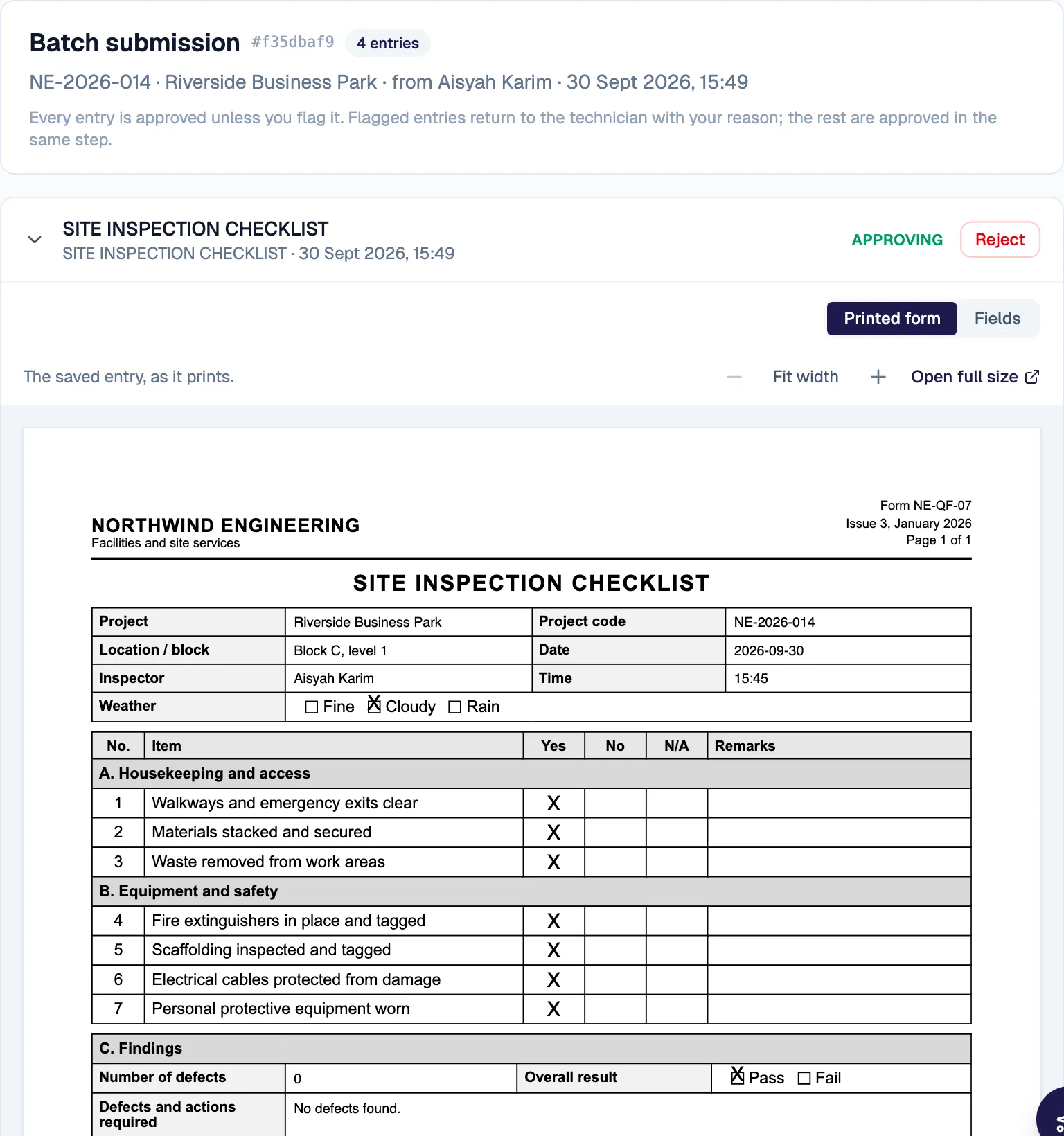
The review queue now shows each record as the printed form it will become, with its photos underneath.

How it works

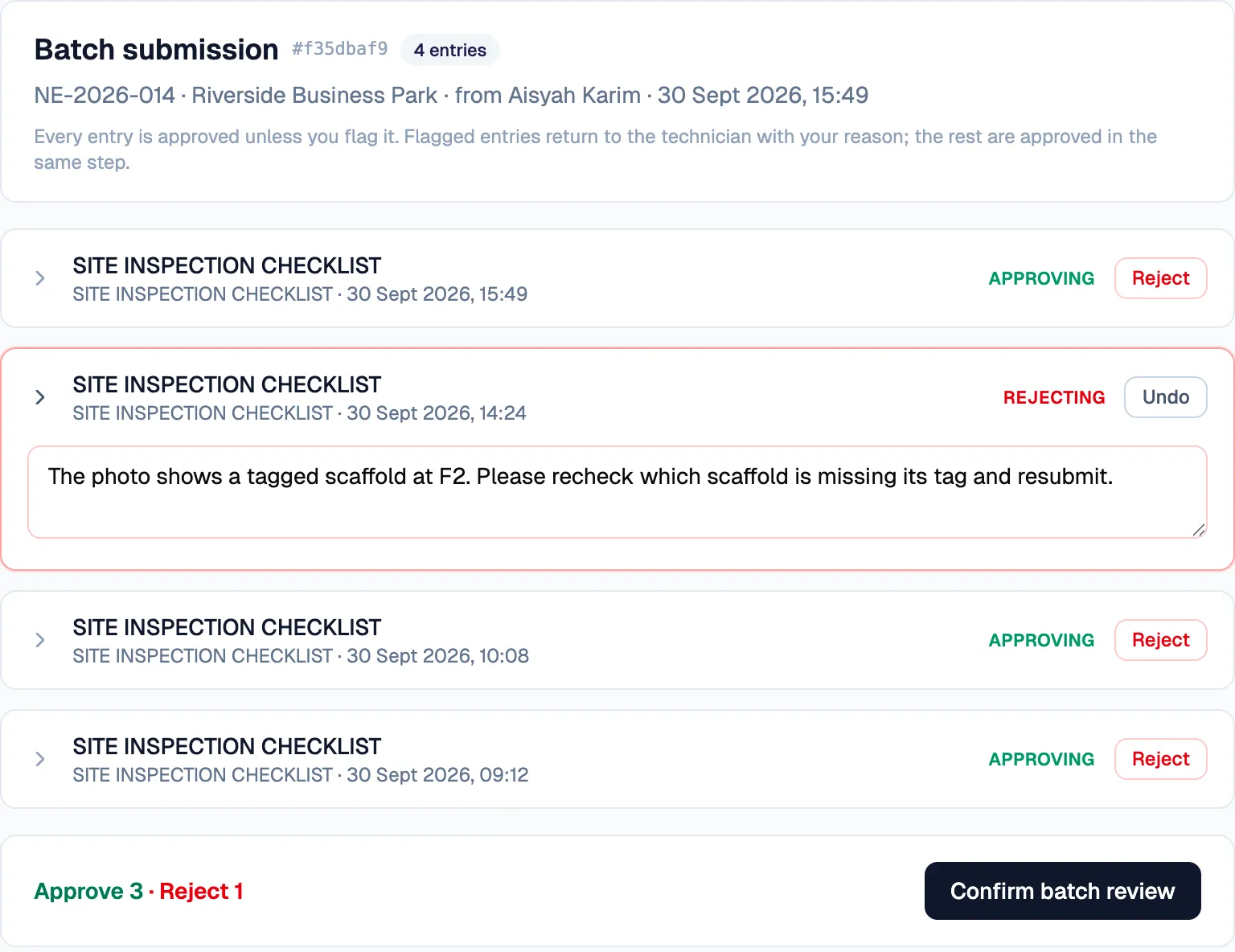
  • A batch submitted together is one card, and every record in it is approved unless the checker flags it.
  • A flagged record needs a written reason and goes back to the person who submitted it.
  • One confirm applies the whole verdict.
  • Each record’s history keeps who decided what, with the old and new values.
A record in the review queue, shown as its printed paper form.
One record of four flagged with its reason; the footer reads approve 3, reject 1.

Fictional data · real product screens

05Access and permissions

See who gains or loses access before anything changes.

Before
Access lived in database grants that nobody at the organisation could see or reverse.
What changed
Each application now shows who can do what, phrased as the questions people ask, and the person who looks after it can change it.

How it works

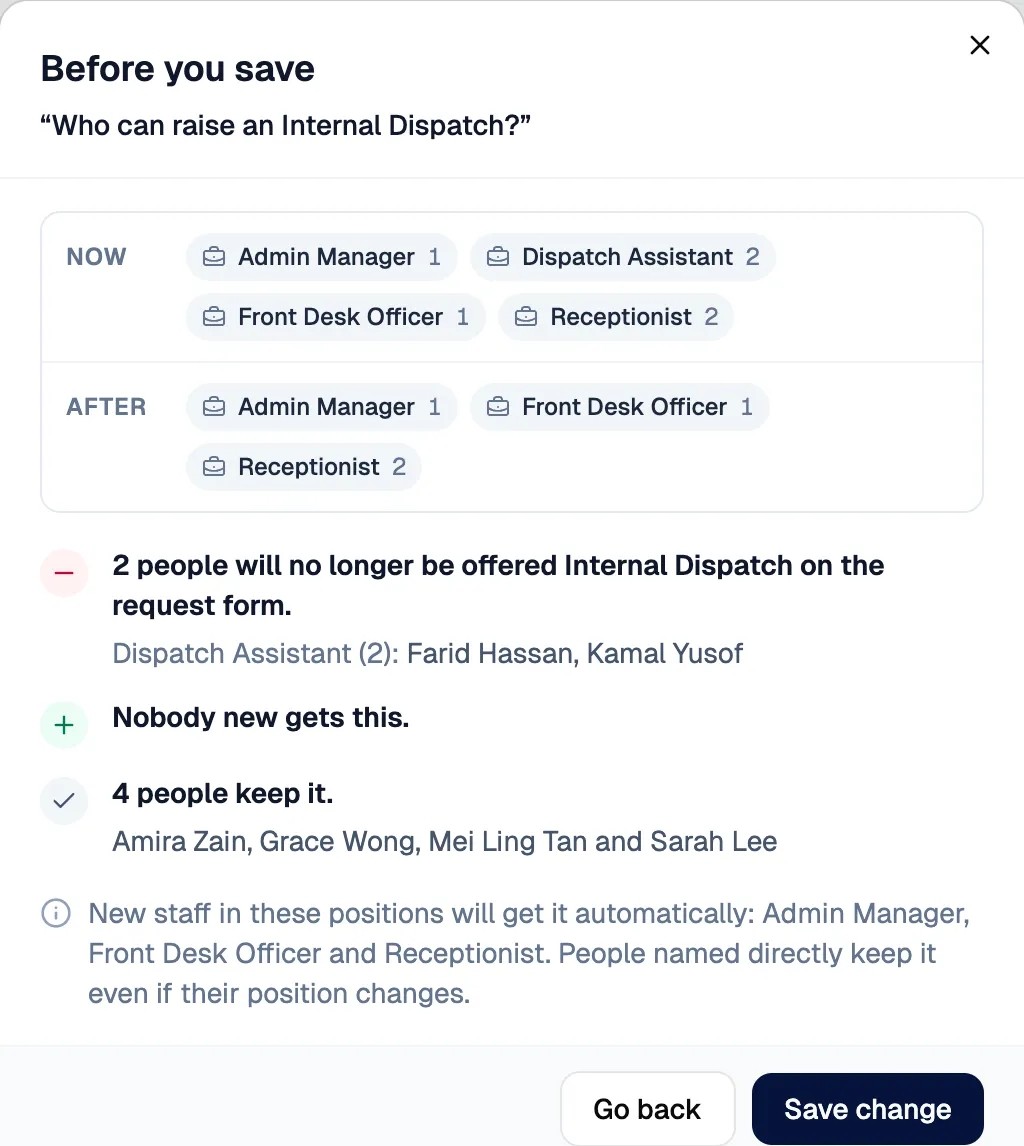
  • Remove or add a position, and a preview lists who will lose access, who gains it and who keeps it, before anything is saved.
  • Every change lands in the history, with undo.
  • The assistant answers who can do what, and turns a request into a proposal card. It has no way to apply a change: only the person’s Confirm does.
  • Its lookups run as the signed-in person, so it sees only what they may see, and it may not name anyone the lookup did not return.
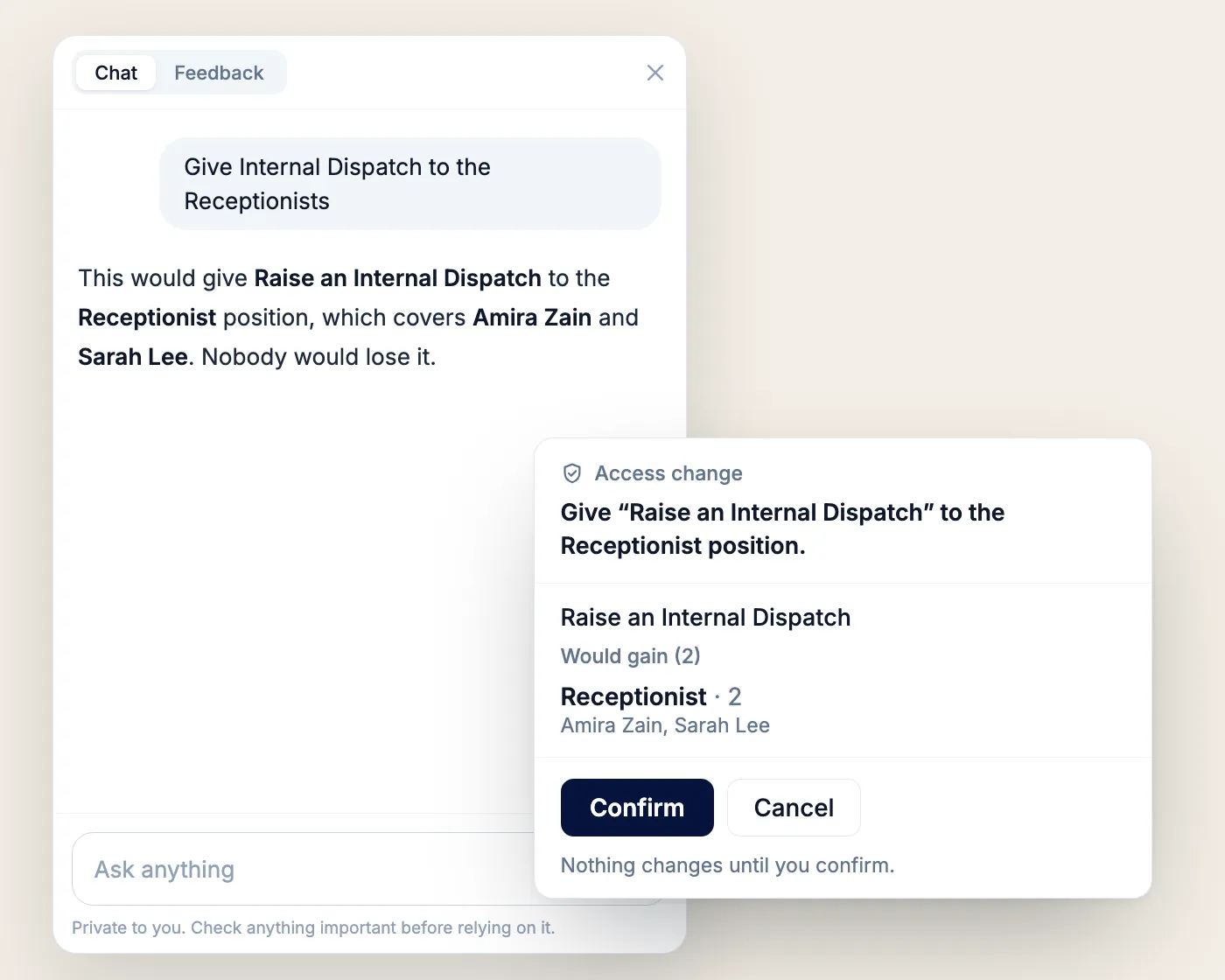
An access change proposed by the assistant, waiting for a person to confirm.
The assistant answers who can raise an Internal Dispatch from the access settings, turns a request into a proposal listing who would gain access, and the change applies only after a person presses Confirm. It then appears in the access history as made through the assistant.

Fictional data · real product workflow, illustrated · waits shortened
06Purchasing

An approval chain that builds itself from the request.

Before
A paper requisition and approval process.
What changed
A request routes to the right approvers by its type and total, and the purchase order comes out of the same record.

How it works

  • Every approver the total and type require is asked at once; a role is satisfied when any holder approves.
  • Purchasing adds supplier options, the requester picks one per item, and the prices lock.
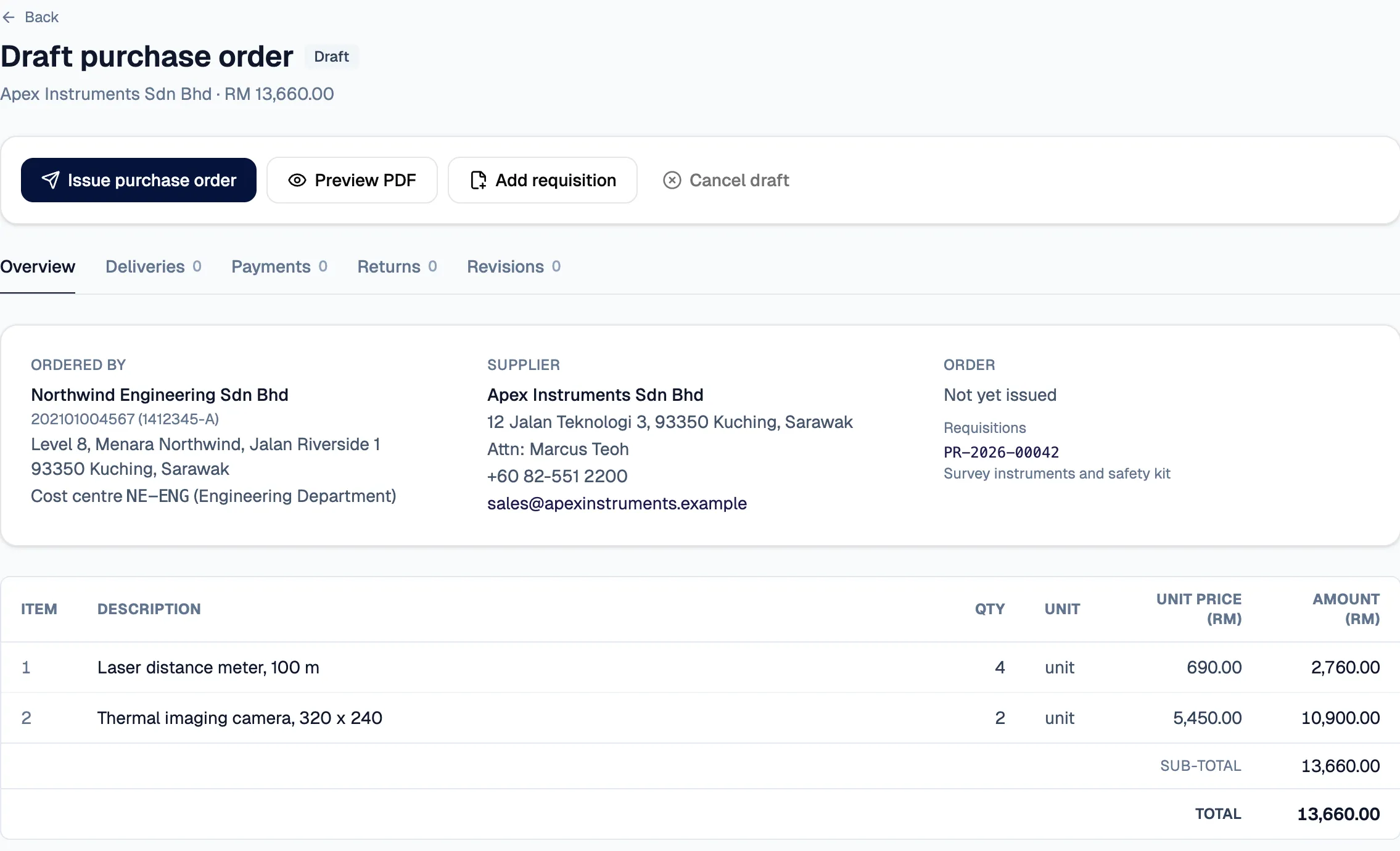
  • Purchase orders are generated per supplier, on the right company’s letterhead, and emailed.
  • Deliveries and payments close the order.

Evidence

  • Go-ahead to live on production in seven days, with a 1,269-item catalogue (build time, not usage)
A draft purchase order generated for one supplier, with the ordering company’s details.
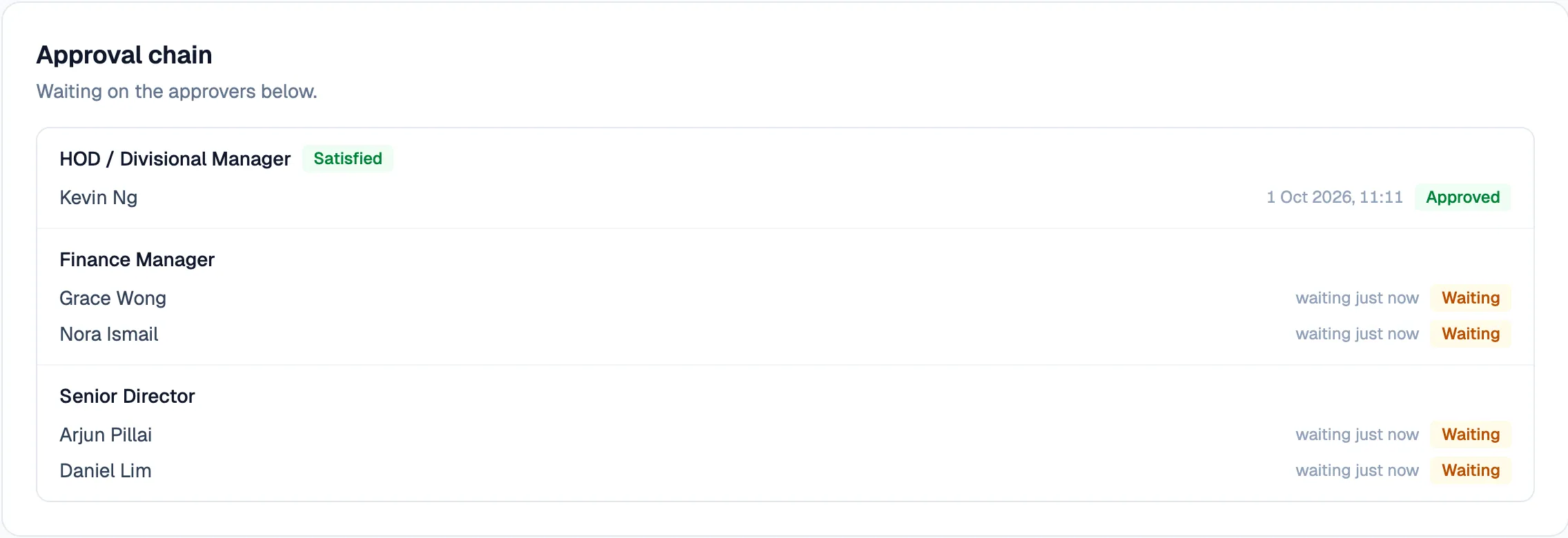
The approval chain for a request: each required role and who holds it, asked at once.

Fictional data · real product screens

Delivery timelines

Measured from commit history, one system at a time.

  1. Same day

    Five changes requested during a morning site walkthrough were live that evening.

    08:30 · Walkthrough → Evening · Live

  2. 7 days

    Purchase-to-pay workflow, from go-ahead to production.

    Go-ahead → Production

  3. 7 build days

    Event and venue booking, built across web and phone.

    Web · 4 days → Phone · 3 days

  4. 1 week

    Company-wide assistant, from idea to first users.

    Idea → First users

Build time from commit history and project records · each line is a separate system · build speed, not usage

Show us how your business works.

Start with one workflow. We will walk it with the people who run it.

We reply within 48 hours.

WhatsApp
+60 17-783 8848 (opens in a new tab)
Email
hello@galavate.com
Based in
Kuching, Sarawak, Malaysia